
Java Access Modifiers - Public, Private, Protected
Introduction
Java access modifiers help structure your program to have proper scoping. Learn the differences between the keywords public, protected, and private, and how you can use them cleanly and effectively. This tutorial will help to clarify some of the examples of one of the previous tutorials, Java inheritance.
Public
Public is the most well known of the Java keywords. Public is also the easiest of the Java access modifiers because of its nature. A variable or method that is public means that any class can access it. This is useful for when the variable should be accessible by your entire application. Usually common routines and variables that need to be shared everywhere are declared public. Here's an example of a MathUtil class that has common math routines and variables.
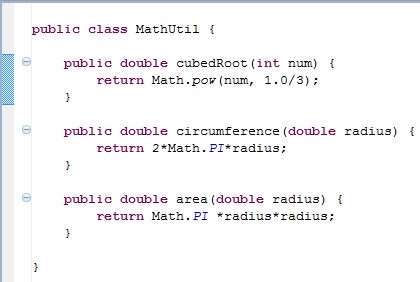
These routines and variables can be accessed from anywhere. This means if you have a MathUtil object in any other class, you can use its public methods and variables:
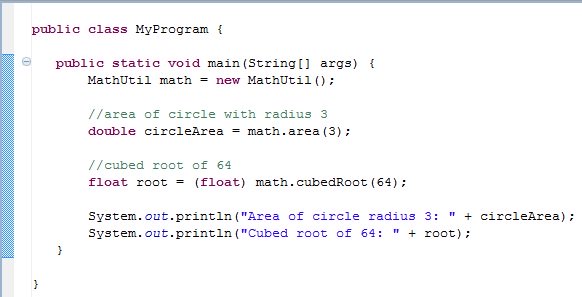
Java's public access modifier is the least protective of the modifiers, and should be used only when you absolutely know that you want anything and everything to be allowed access to the methods and variables.
Private
Private helps to encapsulate your methods and variables most effectively. What do I mean by encapsulate? I mean that only things that should be able to access those methods and variables can do so. There is actually only one way a private method or variable can be accessed: within the class that defined them in the first place. Private variables and methods are those that are meant to be directly accessed by the Java class that owns them. Here's an example of a Dog class that contains both private variables and private methods:
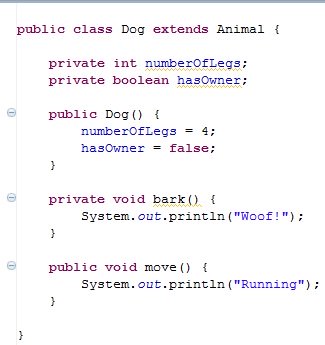
In that example, bark() and the variables numberOfLegs and hasOwner are private, which means only the Dog class has access to them. This is NOT allowed:
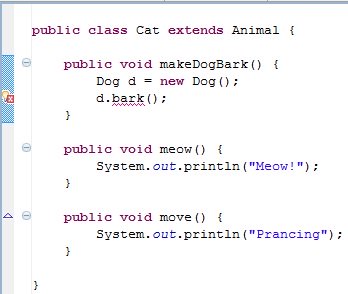
This is because the Cat class does not have that method, so it cannot call it; Only Dogs can call it. Eclipse even gives you an error if you try to use that method. However, that brings up a good point: if you are inside of the dog class, you can call any dog's private methods and variables. That means you're allowed to access another dog's method from within the dog class, like this:
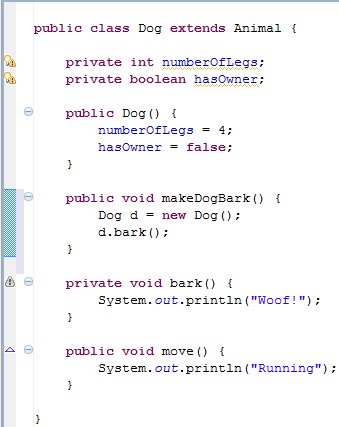
Notice how the makeDogBark() method creates another dog, and then calls that dog's bark() method. You can always call a method from a class if you are already inside that class, regardless of what object you're working with!
The bottom line is, you want to use private access modifiers for when you don't want to be able to call methods or reference variables from anywhere.
Protected
Protected is one of the trickier of the Java access modifiers, but it is not difficult to understand! Protected variables and methods allow the class itself to access them, classes inside of the same package to access them, and subclasses of that class to access them. Let's say we define a protected method in Animal called eat(). Now, we can use it in the Dog class if Dog is a subclass of Animal (using extends). Also notice that a Chair is NOT a subclass of Animal and therefore has no access to the method. The below picture illustrates this:
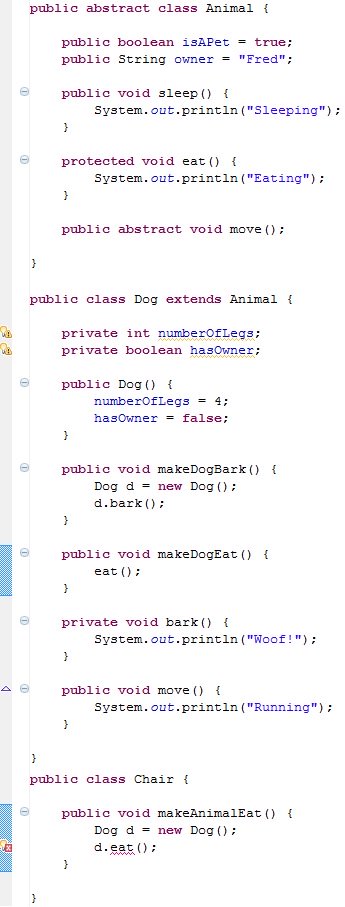
In the picture, you will see that Animal has a protected eat() method, and Dog, since it's a subclass, can call that method. Chair on the other hand is not a subclass and is also not in the same package as Animal, so it has no access to eat() when it tries to use it. As mentioned, any class in the same package as the class also has access to the method, but we won't touch on that to much as its a much rarer use case of protected.
Package Protected (No modifier)
What happens if you do not put any of the Java access modifiers on your methods and variables? Java will still compile your code, so what gives? No access modifier at all means that the method or variable defaults to package protected. This means that only the same class and any class in the same package has access. You get all of the same access as protected minus the ability for subclasses to access the method or variable (unless the subclass is in the same package).
One of the core strengths of Java is being able to handle different levels of access modifiers so that your code is a lot more readable and maintainable. It also helps to reinforce a programmer's wishes as to what can and what cannot be done. It helps to provide a certain organization of code that helps other programmers to read it, as well as helps you remember what you'd like to and what you'd like not to be able to do with your code.
If you'd like to see a table that shows which modifier gives what kind of access, I highly recommend Oracle's page on controlling access to members of a class. It even has tips on which access modifier you should use!
That concludes this tutorial. If you have any questions, comments, or concerns about Java access modifiers, feel free to contact us.


