
Java Updates - News about Java and Java Made Easy
Welcome to the Java Made Easy blog! Here you'll find news about Java and Java updates, as well as new information about this site. If you have a suggestion to make about the blog/site or a piece of news you'd like reported, please contact us through the contact page. Thanks for stopping by!
Note: Don't forget to sign up to the blog by clicking here or by right-clicking on the RSS button on the sidebar, clicking on copy shortcut, and then putting the URL into your RSS reader. Or, click on Google, Yahoo, MSN, or Bloglines to add this site to your subscriptions from there!
Feb 13, 2012
Install Java
Have you ever given up on trying to program because you couldn't figure out how to set it up? This tutorial will show you how to install Java and Eclipse.
Feb 03, 2012
Java Updates - News about Java and Java Made Easy
The Java Made Easy blog provides Java updates and news as well as updates and news about the site itself. Readers may make suggestions about Java news by going to the Contact Us link in the sidebar.
Continue reading "Java Updates - News about Java and Java Made Easy"
Feb 03, 2012
Fresh Cup of Java Newsletter
Fresh Cup of Java is a free Java Newsletter full of valuable Java tips and samples!
Feb 03, 2012
New Site Design
Java Made Easy is going through a redesign!
The site is quite old and could use a freshening up. As such, we will slowly be rolling out a new site design. Until all of the pages have been converted, you will see the old style on those pages that have not been touched yet.
Not to worry though! None of the content will be missing and the redesign should still be just as easy to navigate!
Stay tuned for more exciting updates!
Feb 01, 2012
Java JFrame - Making Main Windows
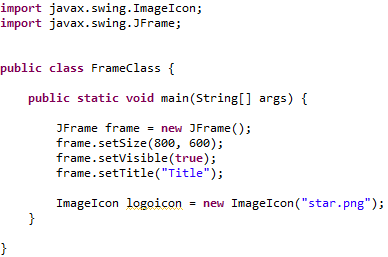
In Java JFrame lets your programs have a main window just like other graphical programs. Learn how to use them easily today!
Jan 29, 2012
Java Graphics Tutorials
These Java graphics tutorials will teach you how to make windows, buttons, and dialogs in Java with Java Swing!
Jan 12, 2012
A New Year, A New Beginning!
First of all, I would like to apologize for the complete lack of updates to this website. The past year has been a rather busy one and all of the things that were going to start getting rolled out last year didn't. This includes the Fresh Cup of Java newsletter, of which only a SINGLE edition ever came out!
So, there are going to be a couple of changes in the next few weeks.
First of all, the Fresh Cup of Java newsletter will not be monthly. It will be more like 1 every 3 months. Also, its content will consist more of updates to the site and answers to submitted questions than anything else.
I have removed the Java programming jobs section because that's really no the point of the site. The point of the site is to have beginners and others learn Java in a way that's easy to understand. Maybe in the future that can return, but for now this site will stick to awesome tutorials.
Java graphics and GUI tutorials are coming soon! There will be a new section on the site called Java Swing that will deal with Java graphical user interfaces. That has been highly requested and will show up soon enough!
ALSO, I have been writing an e-book about making real Java applications. The book is for beginners and assumes that you have at least done the Hello World tutorial on the site. But even if you haven't, the book has tons of links back to Java Made Easy for if you need to refresh your memory about some topics. The book is not out yet but I will continue to update about it and may even release a preview to the newsletter subscribers.
If I haven't gotten around to answering your question(s) via email, I apologize. I simply get too many emails to answer them all!
That's all for now. Happy new year and good luck in your Java learning adventures!
Oct 06, 2010
Java Programming Jobs
Looking for Java Programming Jobs? Find part time and full time Java jobs or advertise your Java programming projects here!
Oct 02, 2010
First Issue of Fresh Cup of Java Newsletter Live + Coming Soon!
For those who have signed up for the newsletter, the first issue has gone out! If you are signed up for the newsletter and did not receive your copy for whatever reason, please email us on our Contact Us Page and let us know so we can try to resolve this problem!
For those of you who have not signed up, don't worry, you can still sign up and get all of the future editions of Fresh Cup of Java! You can sign up to the newsletter by clicking here. The next issue of our newsletter will include answers to frequently asked questions, sneak previews of site updates, an article on how to better think like a programmer, and new Java job opportunities. This list isn't set in stone, but these are at least the features that will be in the next issue.
The Advanced Java tutorials section is almost complete. There is one last tutorial on Generics that has to be covered and then the core set of tutorials will be complete!
So, what's next? There will definitely be more tutorials coming up in an entirely new section! Those who have subscribed to the newsletter know all about it (a sneak preview :D ), but I will keep everyone else updated as more progress is made towards the new set of tutorials.
That's all for now. Again, remember you can sign up to our free Java newsletter by clicking here, and please stay tuned for future updates. Thanks!
Sep 30, 2010
Sign Up To Our Java Newsletter Before It's Too Late!
Our first issue of our Java Newsletter - Fresh Cup of Java is soon to be released! Don't miss out on the content of the first issue because you signed up too late! It's 100% free to sign up and receive great stuff such as answers to frequently asked questions, sample Java programs, bonus tutorials, and much more! So, don't miss out on our first issue and sign up today! Click here to sign up. Thanks!


